Podcast Show Notes Creator: SEO-Optimized Show Notes in Two Minutes
The Podcast Show Notes Creator is a free skill that converts a podcast transcript, outline, or rough notes into complete, publish-ready show notes in minutes. Output includes: episode summary (2–3 paragraphs optimized for search), timestamped chapter list with descriptive labels, 3–5 highlighted key quotes with attribution, guest bio block with links (for interview episodes), resource and link list from mentions in the episode, and 3 platform-specific social captions (Twitter/X thread opener, LinkedIn post, Instagram caption). Takes 2 minutes instead of 45, and the SEO-optimized summary increases the episode's discoverability in Apple Podcasts, Spotify, and Google search.
Show notes are the part of podcast production that most podcasters treat as an afterthought. They're written in five minutes, published as a two-sentence summary, and forgotten. This is a mistake — not because show notes are intrinsically important, but because well-written show notes do two things that matter: they increase the episode's discoverability in search, and they're the first thing a potential listener reads when deciding whether to press play.
A generic show notes entry doesn't serve either purpose. A specific, well-structured episode description with timestamps, key quotes, and a resource list does both.
The Podcast Show Notes Creator produces the complete package in the time it takes to paste in a transcript.
Episode Summary
The episode summary is the highest-leverage element of show notes for discoverability. Apple Podcasts, Spotify, and Google all index show note content for search — a podcaster who writes a keyword-rich, specific description for every episode builds search visibility over time in a way that generic summaries don't.
The summary the skill writes is:
Two to three focused paragraphs — long enough to be informative, short enough to be read before the listener decides to press play. The first paragraph leads with the episode's core topic and why it matters to the specific listener. The second expands on the main insight or argument. The third sets up what the listener will come away knowing or being able to do.
Search-optimized without keyword stuffing — the skill uses the episode's natural vocabulary to target the terms a listener would actually search, placing them in positions (first sentence, headings if used, resource names) where they have maximum search weight without distorting the readability.
Written to prompt the play — the summary is conversion copy. Its job is to answer "should I listen to this episode?" for a new listener who found it in search. The specificity of a good summary — concrete topic, named insight, identifiable guest or case study — signals that the episode delivers real content rather than vague discussion.
Timestamped Chapters
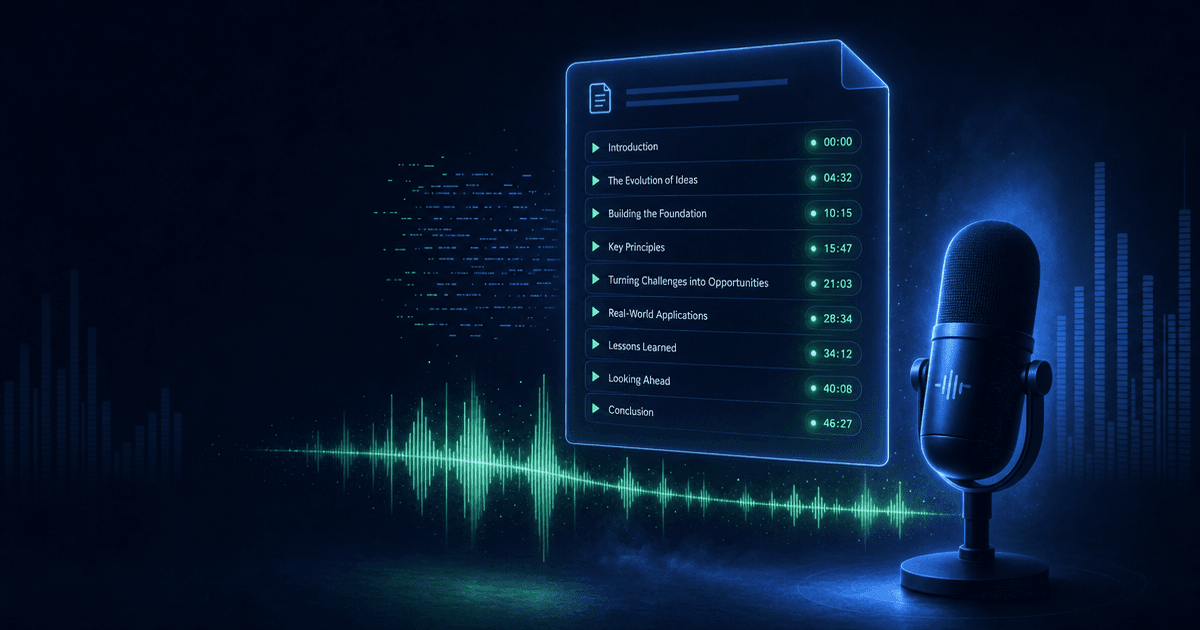
Timestamps serve two audiences simultaneously: existing listeners who want to navigate the episode, and new listeners evaluating it from the show notes. A timestamp list that shows the episode's structure is proof of content density.
The skill generates timestamps with:
Descriptive chapter labels — not "Introduction" but "Why most podcasters skip SEO (and what it costs them)." The label should communicate what happens in the segment, not just label it. A listener skimming timestamps can see the full shape of the episode from the chapter list.
Natural break points — chapters at every meaningful transition rather than at arbitrary time intervals. An interview episode typically has chapters at each major topic shift; a solo episode has chapters at each segment.
The timestamp format matches the platform: 00:00 for Spotify and YouTube descriptions, [00:00] for Apple Podcasts show notes.
Key Quotes
Three to five highlighted quotes from the episode, formatted for sharing. The quotes the skill selects are:
- Specific and self-contained (understandable without context)
- Quotable rather than explanatory (the punchline, not the setup)
- Attributable (including the guest's name for interview episodes)
The key quotes section has two practical uses: listeners who save the show notes return to find the quotes they wanted to reference, and the quotes are social-ready for the social caption generation step.
Guest Bio Block
For interview episodes, the skill writes a guest bio block that includes:
- A two to three sentence professional description in the third person
- The specific focus area relevant to this episode (not the guest's full career biography)
- Links to the guest's website, primary social platform, and any specific resource mentioned in the conversation
The guest bio is written to serve the episode's listeners rather than the guest's ego — its job is to establish why this specific person's perspective on this specific topic is worth listening to.
Resource and Link List
Every mention in the episode that includes a resource, tool, book, study, or reference gets captured and listed with:
- The name as mentioned in the episode
- A direct link
- A one-line context note (when the mention was brief or the resource isn't self-explanatory)
The resource list is what converts a passive listener into an engaged one — it's what separates "I heard about a book on a podcast once" from "I bookmarked it from the show notes and bought it."
Three Social Captions
The skill generates one social caption per major platform, each written for the platform's format and audience behavior:
Twitter/X thread opener — a single tweet that hooks with the episode's best insight, followed by a reply thread structure that unpacks three supporting points and ends with a listen link. The opener can be used standalone or expanded into a full thread.
LinkedIn post — professional framing with the episode's business-relevant insight in the first paragraph, a brief description of what the conversation covered, and a CTA for LinkedIn's professional audience.
Instagram caption — benefit-forward hook, episode context, and a "link in bio" CTA. Written for Instagram's carousel-and-caption format where the caption is visible after the initial swipe, so it doesn't have to carry the full weight of the hook.
How to Use It
Paste the episode transcript, your rough outline, or detailed notes from the recording. Include the guest's name, title, and website link for interview episodes. Describe your show's topic and audience if this is the first time using the skill (for voice calibration). The skill produces the complete show notes package in a single output.
Pricing and Where to Get It
The Podcast Show Notes Creator is free. Works in Claude and ChatGPT — paste your transcript or outline, get back complete, SEO-optimized show notes ready to publish.
→ Get the Podcast Show Notes Creator
Pair It With
- Podcast Production Suite — The Show Notes Creator handles post-production writing; the Production Suite handles the full upstream workflow — episode planning, interview prep, script outlines, guest outreach, and launch strategy.
- Content Repurposing Planner — The social captions from the Show Notes Creator are a starting point; the Repurposing Planner maps the full cross-platform strategy for extracting clips, newsletter content, and blog posts from the same episode.
- Post-to-Thread Converter — For podcasters who want to expand the Twitter/X caption into a full thread, the Thread Converter takes any long-form content and structures it as a complete Twitter thread with proper pacing and engagement hooks.
Show notes that take forty-five minutes to write are show notes that don't get written. The Podcast Show Notes Creator makes the process fast enough that there's no excuse to skip it — and good enough that the SEO and listener conversion value compounds with every episode published.
About the author
Content, CreatorSkills
The CreatorSkills team publishes practical guides on AI workflows for content creators.
About CreatorSkills