Post-Purchase Survey Automation: Capture Customer Feedback When It Actually Matters
The Post-Purchase Survey Automation is a complete survey infrastructure for marketplace operators: a 3-question format (NPS + usage check + open feedback), automated delivery via Resend email API at Day 7 post-purchase, a SURVEY15 15% discount incentive delivered on completion, a Day 14 reminder sequence for non-responders, Prisma database models (SurveySchedule and SurveyResponse tables), API endpoints for scheduling and response capture, and an analytics dashboard with NPS tracking and coupon redemption ROI. Designed for product operators who need systematic feedback loops to validate product-market fit rather than informal one-off surveys.
Most creators and marketplace operators get customer feedback in the worst possible way: a random email months after purchase, a one-star review with no explanation, or a support ticket from someone who's already frustrated. The feedback arrives too late to act on, too sparse to detect patterns, and too unstructured to prioritize against.
The problem isn't that customers don't have opinions — it's that no one asked them at the right moment. Seven days after purchase is the ideal feedback window: the customer has used the product enough to form a real impression, the experience is still fresh, and they're still in the engagement phase where they're most likely to respond.
The Post-Purchase Survey Automation builds the infrastructure to capture that feedback systematically.
The Three-Question Survey Format
The skill is built around a deliberate constraint: three questions, no more. Survey completion rates drop sharply beyond three questions, and for most product decisions, three well-chosen questions surface more signal than a ten-question form that 80% of respondents abandon.
The three questions:
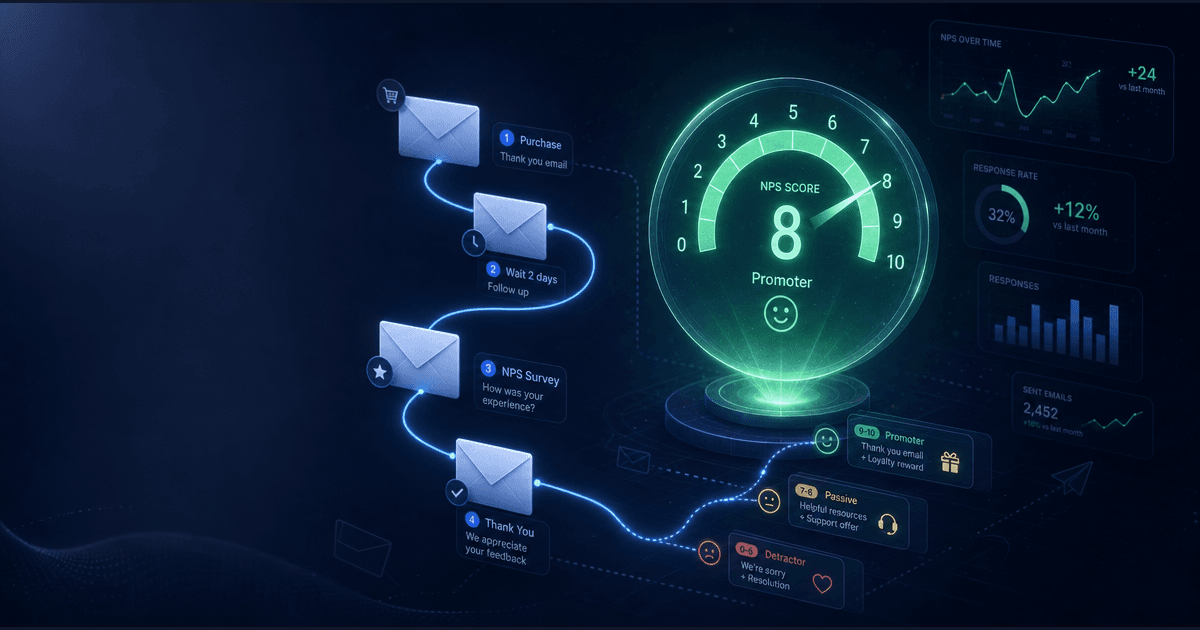
Net Promoter Score (NPS) — "On a scale of 0–10, how likely are you to recommend [product] to a friend or colleague?" The NPS question is a standard diagnostic for overall satisfaction and loyalty. It produces a quantifiable score that can be tracked over time and benchmarked across products. Scores 9–10 are Promoters, 7–8 are Passives, 0–6 are Detractors. NPS = % Promoters − % Detractors.
Usage check — "Have you had a chance to use [product] yet?" The binary yes/no gates the interpretation of everything else. A Detractor score from someone who hasn't used the product yet is different information than a Detractor score from someone who used it and was disappointed. Knowing which population responded changes the analysis entirely.
Open feedback — "What's the most valuable thing you got from [product], or what would make it better?" The open field is where product insights actually live. The NPS tells you whether customers are happy; the open field tells you why and what to do next. This question is deliberately dual — it captures both value (useful for testimonials and marketing) and improvement suggestions (useful for product roadmap).
Three questions. One clean email. Thirty seconds to complete.
Email Delivery Architecture
The automation runs on two timed emails:
Day 7: The survey send. Arrives one week after purchase — far enough out that the customer has had time to use the product, close enough that the experience is still top of mind. The email is written to feel personal, not automated: it leads with the specific product name, uses the customer's first name, and frames the survey as a product conversation rather than a data collection exercise.
The subject line options are tested for open rate: "Quick question about [product name]" and "[First name], 60 seconds?" both outperform generic "We'd love your feedback" framings because they're specific and honest about the time commitment.
Day 14: The non-responder reminder. Sent only to customers who received the Day 7 email but didn't complete the survey. The reminder takes a different angle — it leads with the discount incentive rather than the survey itself: "Complete a quick 3-question survey and get 15% off your next purchase." This is intentional. Some customers need a reason to click; the discount converts non-responders who were aware of the survey but hadn't prioritized it.
The reminder is sent once. No further follow-up. Survey fatigue is real, and a third email reads as spam.
The Incentive Design
The 15% discount code (SURVEY15) is delivered automatically on survey completion — not promised in the email and delivered later, but generated and included in the thank-you response immediately after the final question is answered. This closes the feedback loop quickly and eliminates the friction of a delayed reward.
Why 15%? High enough to feel meaningful on a $7–$19 purchase, low enough not to cannibalize margin on higher-ticket items. The incentive is structured as a Stripe coupon, which means it works with the existing checkout infrastructure without requiring new payment logic.
The analytics dashboard tracks coupon redemption separately from survey completion. The gap between "completed survey" and "redeemed SURVEY15" is a useful leading indicator of customer intent to purchase again — and the revenue from redemptions provides a concrete ROI figure for the survey investment.
Database Architecture
The system adds two Prisma models:
SurveySchedule — tracks which customers are in the survey pipeline. Fields include the customer email, the product slug, the purchase timestamp, the Day 7 send time, the Day 14 reminder time, completion status, and reminder sent flag. This table is the queue that the automation works through — records are inserted on purchase and updated as emails are sent and surveys are completed.
SurveyResponse — stores the completed survey answers. Fields include the schedule ID (foreign key), the NPS score, the usage check boolean, the open feedback text, the timestamp, and the discount code delivered. This table is the source for all analytics.
The schema is lightweight — two tables, no external data stores, no additional infrastructure beyond the existing Prisma setup. The automation runs as scheduled functions against the existing database rather than a separate service.
API Endpoints
Three endpoints handle the survey lifecycle:
POST /api/surveys/schedule — called on purchase completion to create a SurveySchedule record for the new customer. Takes customer email, product slug, and purchase timestamp. Returns the schedule ID. This is the entry point for the entire system — one call at checkout inserts the customer into the feedback pipeline.
POST /api/surveys/{id}/respond — handles survey submission. Takes the schedule ID and the three survey answers. Records the response, marks the schedule as complete, generates and delivers the SURVEY15 coupon, and returns a thank-you response. The endpoint validates that the schedule ID exists and hasn't already been responded to — duplicate submissions are rejected.
GET /api/surveys/analytics — returns the aggregated dashboard data: total responses, NPS breakdown by category (Promoters/Passives/Detractors), the calculated NPS score, usage rate among respondents, open feedback responses sorted by NPS score for easy review, and coupon redemption statistics. All filtering is by product slug and date range.
Analytics Dashboard
The analytics output surfaces five numbers that drive product decisions:
Response rate — completed surveys divided by sent surveys. Healthy response rates for post-purchase surveys run 20–35%. Below 15% usually indicates a timing or subject line problem with the Day 7 email. Above 40% is strong.
NPS score — the headline metric. Calculated as % Promoters minus % Detractors. A new product with limited history should aim for NPS above 30; an established product with a loyal customer base typically scores above 50.
Usage rate among respondents — the percentage who said "yes" to the usage check question. This segmentation is essential for interpreting NPS: a low NPS with low usage means the product needs better onboarding; a low NPS with high usage means the product itself needs improvement.
Feedback themes — the open responses grouped by NPS tier. Promoter feedback identifies what to amplify and quote in marketing. Detractor feedback identifies what's failing. Passive feedback identifies what's merely adequate and could be a differentiator with more investment.
Coupon redemption rate and revenue — the ROI measurement. Redemptions divided by survey completions gives the repeat purchase conversion rate. Revenue from SURVEY15 redemptions demonstrates the business case for the survey program and gives the operator data for adjusting the discount level.
Email Templates
The skill includes fully written email templates for both the Day 7 survey and the Day 14 reminder. The templates are designed to match the creator marketplace voice — direct, helpful, respectful of the customer's time — and include variable placeholders for customer name, product name, and the personalized survey link.
The survey link is unique per customer (derived from the SurveySchedule ID), which means each submission is tied to a specific customer record. This prevents anonymous gaming of the discount incentive and allows the analytics to be segmented by customer cohort if needed.
The TEMPLATES.md file in the skill package includes multiple subject line variations A/B tested against the Day 7 send — operators can swap subject lines without touching the underlying logic.
Setup and Integration
The SETUP.md file walks through the complete integration in four steps: adding the two Prisma models and running prisma migrate deploy, configuring the Resend API key and the discount percentage in environment variables, adding the POST /api/surveys/schedule call to the existing purchase webhook, and scheduling the survey send functions (Day 7 and Day 14) via the platform's cron infrastructure.
The skill is designed to integrate into an existing Next.js + Prisma + Resend stack without introducing new dependencies. Operators already running CreatorSkills infrastructure have everything required.
How to Use It
Provide your product catalog (slug, display name, purchase price for ROI calculations), your Resend API configuration, and your brand voice guidelines for the email copy customization. The skill generates the complete survey package: Prisma schema additions, API endpoint implementations, email templates, scheduling logic, and analytics dashboard.
For operators who want to modify the three-question format, the SKILL.md documents the tradeoff: every additional question costs completion rate. The current format is the minimum necessary to produce actionable product decisions.
Pricing and Where to Get It
The Post-Purchase Survey Automation is $7, one-time. Works in Claude and ChatGPT — describe your product catalog and tech stack, get back a complete survey system with database schema, API endpoints, email templates, and analytics dashboard.
→ Get the Post-Purchase Survey Automation
Pair It With
- Creator Business & Tax Tracker — For marketplace operators tracking revenue and expenses, the Tax Tracker handles the bookkeeping and tax infrastructure around the income that the survey system helps generate repeat purchases of.
- Newsletter Conversion Engine — Survey Promoters are the highest-intent audience for upsell and cross-sell campaigns. The Conversion Engine provides the email optimization framework for converting that goodwill into additional revenue.
The most valuable customer data a marketplace operator can have is what customers think in the first week after they buy. The Post-Purchase Survey Automation captures that window systematically — turning a moment that most operators miss into a repeatable feedback loop, a repeat-purchase driver, and a product prioritization signal.
About the author
Content, CreatorSkills
The CreatorSkills team publishes practical guides on AI workflows for content creators.
About CreatorSkills