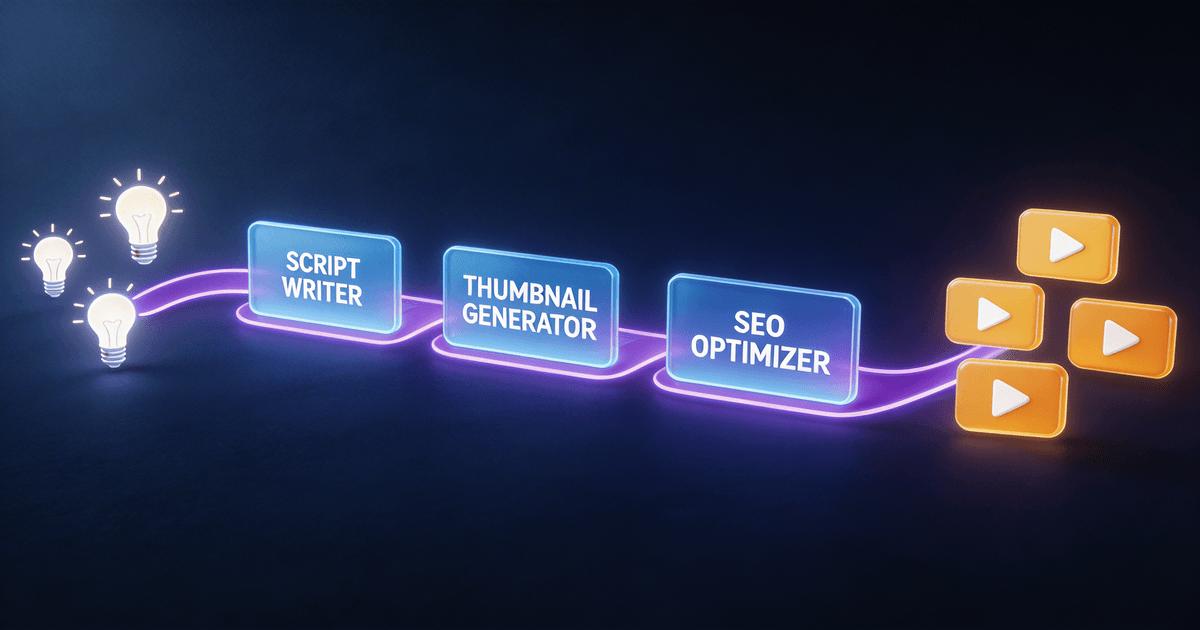
How to Use AI to 10x Your YouTube Workflow
A complete AI workflow for YouTube creators covers scripting (20 min vs. 2+ hours), thumbnail concepts (3 min vs. 90 min), analytics interpretation, and content repurposing. This guide maps the full production pipeline with specific AI skills for each stage.
The average YouTube creator spends 6-10 hours producing a single video. About 3 of those hours are pure structure work: outlining, scripting, writing titles and descriptions, designing thumbnails, and figuring out what your analytics actually mean. (For a broader look at how AI saves time across every content type — not just YouTube — see our AI content creation workflow guide.)
AI can handle most of that structural work — not perfectly, but well enough that your job becomes reviewing and refining a strong draft instead of staring at a blank page.
This guide walks through every stage of the YouTube production pipeline and shows specifically how to use AI at each step. By the end, you'll have a clear picture of where AI saves the most time and which tools are worth using.
The YouTube production pipeline
Most YouTube videos go through the same six stages:
- Research and ideation — finding topics worth making
- Scripting — writing what you'll say
- Packaging — titles, thumbnails, and descriptions
- Publishing — uploading and optimizing
- Analytics — understanding what worked
- Repurposing — turning one video into multiple formats
AI has a role in all six. The biggest time savings are in scripting (stage 2) and packaging (stage 3), but the most underrated opportunity is analytics (stage 5) — where most creators leave actionable information on the table.
Stage 1: Research and ideation with AI
Finding trending topics before they peak
The problem with most trend research: by the time you see a topic trending on your For You page, the wave has already crested. The creators who got the views published 2-3 weeks earlier.
AI skills can systematize trend monitoring by checking signals across YouTube search volume, TikTok growth rates, and Google Trends simultaneously. A structured approach looks for topics where search volume is growing but competition (videos published in the last 30 days) is still low.
The Trend Hunter System runs this analysis and returns a prioritized list with virality scores (1-10), content angles specific to your niche, and timing recommendations.
Time without AI: 2-4 hours of weekly research across multiple tools Time with AI skill: 15-20 minutes, structured and consistent
Building content series from a single topic
One underused AI capability: take a topic and generate 10-15 content angles, then organize them into a logical series. This turns one video idea into a 2-month content calendar.
Prompt approach: "I want to make videos about [topic] for [audience description]. Generate 15 video angles at different funnel stages — some for people just discovering this topic, some for people who already know the basics, some for advanced practitioners."
Stage 2: Scripting with AI
Why scripting is the highest-ROI use of AI for YouTube
A YouTube script has a lot of structural components that AI handles well:
- The hook (first 30 seconds — critical for retention)
- Setup (context, stakes, what the viewer will learn)
- Main content (sections, pacing, transitions)
- B-roll callouts (what to show while you're talking)
- CTA (what to tell the viewer to do next)
The hard part isn't knowing these components exist — it's arranging them correctly for your specific video length, topic, and audience. This is exactly the kind of structured task AI is good at.
The scripting workflow that actually works
Step 1: Context gathering
Before asking AI to write anything, give it:
- Your target viewer (be specific: "25-35 year old who runs a side business and has been making YouTube videos for 6 months")
- Your topic (specific, not vague: "how to batch-film 4 videos in one day" not "productivity")
- Desired length (8 minutes, 15 minutes, etc.)
- Your tone (conversational, educational, direct, storytelling)
Step 2: Hook options
Ask for 5 different hook approaches before committing to one. Different hooks work for different audience moods — someone searching for a tutorial wants information fast; someone in passive discovery mode needs a curiosity gap.
Step 3: Outline review
Get the outline first, review it, make any structural changes, then ask for the full script. Changing structure after the full script is written wastes time.
Step 4: First draft
The AI produces the first draft. Your job is to inject your voice, cut what sounds generic, and add the specific examples only you can provide.
The Long-Form Script System is structured around this exact workflow. It handles the framework; you handle what makes the video uniquely yours.
Time to script without AI: 90 minutes to 3 hours Time with AI scripting skill: 15-25 minutes (your total active time, not counting AI processing)
What AI scripting is not good at
- Personal stories — AI cannot write your specific experiences. Give it the structure, add your stories manually.
- Jokes — AI humor is often technically correct but not funny. Write your own or skip it.
- Expert opinion — AI will write confident-sounding analysis that may be wrong in your specific niche. Review claims carefully.
Stage 3: Packaging — titles, thumbnails, descriptions
Packaging (the title, thumbnail, and description) determines whether anyone clicks. You can make the best video on YouTube and get zero views if the packaging fails.
Title optimization
A strong YouTube title has two jobs: match the search intent of someone looking for this content, and create enough curiosity or clarity that they click over a competing result.
AI can generate 10-15 title options in under a minute. The human's job is picking the one that balances SEO and click appeal.
Framework for evaluating AI-generated titles:
- Does it include the target keyword naturally (not stuffed)?
- Does it communicate a specific outcome or promise?
- Is it under 60 characters (so it doesn't get cut off on mobile)?
- Would you click it if you saw it in search results?
The SEO Title & Description Writer generates titles, descriptions, and tags simultaneously, optimized for YouTube's ranking signals.
Thumbnail concepts
AI cannot design a thumbnail — but it can generate concepts with enough detail that a human designer (or you in Canva) knows exactly what to build.
A strong AI thumbnail brief includes:
- Background treatment (color, texture, gradient)
- Subject placement and pose
- Text overlay (5 words or fewer)
- Color palette (2-3 colors max)
- Composition type (close-up face + text, before/after split, numbered list, etc.)
The AI Thumbnail Factory (rated 4.7/5) generates three distinct concepts per video topic, with composition specs and color palettes. It also works directly with GPT Image and Gemini 2.5 Flash to generate actual images if you want to skip Canva entirely.
Time to thumbnail without AI: 60-120 minutes in Canva Time with AI thumbnail skill: 3-5 minutes for concepts, then 20-30 minutes to build
Description writing
YouTube descriptions have two audiences: search algorithms and humans who scroll down. Most creators write for one and ignore the other.
A well-structured description includes:
- First 2-3 sentences (visible without clicking "more"): primary keyword, main value proposition
- Timestamps (if the video is 8+ minutes)
- Links to related videos, skills mentioned, or resources referenced
- Tags and hashtags (3-5 relevant ones at the bottom)
AI handles the first draft well. The timestamps require a human review of the actual video.
Stage 4: Publishing optimization
Beyond the title and description, three things matter for initial performance:
End screen placement — AI can suggest what CTAs to add based on your video content. A tutorial naturally points to a deeper tutorial or a free resource. A gear review points to a buying guide.
Card timing — If you reference specific resources or related videos during your content, cards should appear at those exact moments. Note the timestamps during filming for easier editing.
Tags — Less important than they used to be, but still worth doing correctly. Include: primary keyword, secondary keywords, your channel name, and 3-5 related topic tags. AI generates these in 30 seconds from your title and description.
Stage 5: Analytics — turning data into decisions
This is where most YouTube creators leave the most value on the table.
YouTube Studio gives you data. It does not tell you what to do with it. Most creators look at the numbers, feel vague anxiety or satisfaction, and make the same video they were going to make anyway.
A proper analytics review answers specific questions:
- Which videos have above-average click-through rates? (What did the packaging do right?)
- Which videos have above-average average view duration? (What did the content do right?)
- Where do viewers drop off in your highest-performing videos? (What's costing you retention?)
- Which traffic sources are growing? (Where should you double down on distribution?)
- Which titles, topics, or formats correlate with better performance?
The Analytics Translator takes raw numbers from YouTube Studio and produces answers to these questions in plain English, along with 3-5 specific actions for the next publishing cycle.
What to input: Copy-paste the key metrics from YouTube Studio (impressions, CTR, AVD, subscriber data, traffic sources). The skill handles the interpretation.
What you get: A short report that reads like advice from someone who actually understands your channel data.
Stage 6: Repurposing — 1 video, 5 formats
Most YouTube creators are sitting on an underutilized asset: every video they've made is a source of other content they never created.
A 15-minute video contains enough material for:
- 3-5 short-form clips (Shorts, Reels, TikTok)
- 2-3 Twitter/X threads
- 1 LinkedIn post
- 1 newsletter section
- 1 quote graphic or carousel
- YouTube Community tab posts to keep subscribers engaged between uploads
The free community post ideas skill generates 10+ Community tab post ideas — polls, questions, behind-the-scenes updates — without needing a full video transcript as input. It's the lowest-effort way to stay active on your channel between upload days.
AI handles the extraction and reformatting. You review for accuracy and voice.
The Video-to-Everything Repurposer takes a transcript and produces platform-specific versions of each asset, matching the tone requirements of each platform.
The repurposing math: If each video takes you 7 hours to produce and generates 1 piece of content, your effective content output is 1 piece per 7 hours. With repurposing, the same 7 hours produces 6-8 pieces. The per-piece cost drops from 7 hours to roughly 1 hour.
The complete AI-powered YouTube workflow
Here's the full workflow with time estimates at each stage:
| Stage | Task | Without AI | With AI skill |
|---|---|---|---|
| Research | Trend identification | 2-4 hours/week | 15-20 min |
| Scripting | Full script | 90-180 min | 20-30 min |
| Packaging | Title + description | 20-30 min | 5-8 min |
| Packaging | Thumbnail concept | 60-120 min | 5 min concept + 20-30 min build |
| Analytics | Data interpretation | 30-60 min | 10-15 min |
| Repurposing | Social content | 2-3 hours | 20-30 min |
| Total | Per video | 5-9 hours | 1.5-2.5 hours |
These are honest estimates, not best-case scenarios. The time savings are real, but they require actually using the tools as part of your workflow — not just trying them once.
What to install first
If you're starting from scratch, install one skill and use it for 10 videos before adding another. The creators who get the most out of AI tools build habits, not tool collections.
If scripts are your biggest bottleneck: Long-Form Script System — $7 If you're getting views but not clicks: AI Thumbnail Factory — $7 If you're publishing but don't understand your data: Analytics Translator — $7 If you want the full system at once: YouTube Starter Pack — $19 (saves $114 vs. individual)
Frequently asked questions
Will AI-written scripts sound like me?
The first draft won't. Your job is to add your specific stories, cut the lines that feel generic, and adjust the voice until it sounds like you. Most creators find that 20-30% of the first draft makes it to the final version, with the rest rewritten or cut. That's still much faster than starting from zero.
Do I need to be technical to use AI skills?
No. Installing a skill takes 5 minutes: create a Claude Project, paste the skill text into instructions, and start a conversation. No coding required.
What if my niche is very specific?
Most AI skills include guidance for niche customization. The Long-Form Script System, for example, has specific guidance for gaming, educational, lifestyle, and business channels. If your niche isn't covered, you can add a paragraph to the skill instructions describing your specific format and audience.
How much do AI tools cost for YouTube creators?
Claude Pro and ChatGPT Plus each cost $20/month. AI skills are one-time purchases ($9-$29 each, or bundled at a discount). For a creator who publishes weekly, the monthly cost is $20 for the AI subscription plus whatever skills you buy — usually $50-100 upfront, then nothing ongoing.
Will AI replace YouTube creators?
No. AI handles structural, format-dependent work well. It cannot replicate your specific perspective, experience, relationships, or on-camera presence. The creators most at risk are the ones who add no genuine value beyond the structure — anyone who has something real to say has nothing to worry about from AI.
How do I know if a script sounds too AI-generated?
Read it out loud. If you would never say a sentence the way it's written, rewrite it. Common AI tells: overly formal transitions ("Furthermore," "In conclusion"), vague superlatives ("incredibly powerful," "truly transformative"), and structure that's correct but lifeless. Trust your ear.
For related guides, see how to write a YouTube script with AI for script-specific guidance, or best AI skills for YouTube shorts if you're creating short-form content.
About the author
Founder, CreatorSkills
Caleb Leigh is the founder of CreatorSkills and focuses on buyer-first AI workflows for content creators.
Read the founder profile