AI Voiceover for YouTube: Turn Any Script Into Production-Ready Narration
Most creators discover the hard way that a well-written article reads nothing like good narration. Sentences that work on the page sound robotic aloud. The AI Voiceover for YouTube generates a complete voiceover package: content analysis with the right voice archetype (Expert/Storyteller/Hype Man/Quiet Authority/Casual Friend/Professor), a narration-optimized script rewrite with pacing cues (pauses, emphasis, breathe points), an emotion map by section, and a ready-to-paste TTS prompt with voice settings for ElevenLabs or OpenAI — for any topic, outline, or existing script.
The gap between a written script and production-ready narration is larger than most creators expect. An article that reads clearly on the page sounds flat, robotic, and disconnected when a text-to-speech engine reads it back. Not because the TTS is bad — because the script was never written for ears.
Ears and eyes process information differently. Eyes can re-read a sentence. Ears can't. Eyes handle complex punctuation and attribution naturally. Ears need simpler structures. Eyes can absorb dense paragraphs. Ears need breathing room.
The AI Voiceover for YouTube handles the translation. Give it a topic, an outline, or a full script — it produces a complete voiceover package calibrated to how narrated YouTube content actually works: the right voice archetype, spoken-language adaptations, pacing cues, and a TTS prompt you paste directly into ElevenLabs or OpenAI.
The Six Voice Archetypes
The first thing the skill determines is which voice fits the content. A tutorial on software setup and a documentary about historical events require completely different narration approaches — same archetype applied to both will feel off on at least one.
The Expert — Calm, clear, measured. Slightly slower delivery with deliberate pauses after key points. Best for tutorials, how-to content, and technical guides. Channel vibe: MKBHD, Kurzgesagt. The viewer trusts this voice to be correct, so it can't rush.
The Storyteller — Expressive, warm, dynamic. Pacing varies — it builds toward reveals, lingers on emotional beats, and uses silence as intentionally as speech. Best for documentaries, history, biographies. Channel vibe: Veritasium, Johnny Harris. This voice has personality that a static Expert narration doesn't need.
The Hype Man — Excited, punchy, minimal dead air. Fast transitions, high energy from the first second. Best for product reviews, unboxings, reaction content. Channel vibe: Mrwhosetheboss, Unbox Therapy. The energy IS the content for this archetype; a calm Hype Man is no Hype Man at all.
The Quiet Authority — Steady, trustworthy, slightly serious. Weight on key stats, no rushing through important information. Best for finance, business, self-improvement. Channel vibe: Graham Stephan, Ali Abdaal. This voice's credibility comes from never seeming rushed or casual about what matters.
The Casual Friend — Chatty, relaxed, unpredictable. Natural as a conversation, with organic pauses and occasional asides. Best for vlogs, lifestyle, commentary. Channel vibe: Emma Chamberlain, Casey Neistat. Write this voice exactly like you'd talk to a friend on a walk — not like a professional narrator.
The Professor — Patient, educational, curious. Slow build that carefully unpacks complex ideas. Best for deep explanations, data-heavy content, concept explainers. Channel vibe: 3Blue1Brown, CrashCourse. This archetype can lose viewers if it doesn't earn their patience with genuine intellectual engagement.
Rewriting for Speech
The most common mistake: taking a well-written blog post and narrating it word for word. Blog posts are written for readers. YouTube narration is for listeners.
What changes when adapting written content to spoken narration:
Break long sentences. Two to three clauses maximum per sentence. A sentence that works on the page often becomes breathless when read aloud at normal speaking pace.
Replace written transitions with spoken ones. "Furthermore" and "in conclusion" never sound natural in narration. "So here's the thing" and "and that's the point" do.
Turn passive sentences active. "The experiment was conducted by researchers" becomes "Researchers ran an experiment." Active voice is how people actually speak.
Convert dense lists to conversational flows. "These include A, B, and C" becomes "You see this in three places: A, B, and — most importantly — C." The emphasis markers make the list come alive.
Remove citations in place of natural acknowledgement. Footnotes and inline citations break narration flow. Replace "according to a 2023 Stanford study" with "Stanford researchers found" — same information, better delivery.
What gets added in the adaptation:
Signposting — retention phrases that orient listeners without their eyes. "Here's where it gets interesting." "Okay, but what about—" "So what actually happened?"
Rhythm variety — alternating long and short sentences prevents the monotone pattern that TTS engines amplify into boredom.
Off-script moments — a rhetorical question, a brief aside, a moment that sounds spontaneous. "Okay, I know that sounds counterintuitive. Bear with me." These are the moments that make narration feel human.
Pacing Cues
The skill marks the narration script with seven pacing instructions that creators use directly in their TTS recording or to guide voice actors:
| Symbol | Meaning | When to Use |
|---|---|---|
[pause 1] | 1-second silence | After a key point, before a transition, after a stat |
[pause 2] | 2-second silence | Before a reveal, between major sections |
[emphasis] | Emphasized phrase | Surprising stats, key takeaways, bold claims |
[up] | Slight vocal lift | Rhetorical questions, moments of new energy |
[down] | Slight vocal drop | Warnings, serious stats, section endings |
[breathe] | Natural breath point | Break up dense technical explanations |
[slow] | Deliberately slowed | Important numbers, complex instructions |
These cues matter most for TTS because voice engines require explicit direction to produce natural pacing. Without cues, most TTS systems read at consistent speed regardless of what the content is saying — which means a dramatic reveal gets the same pacing as a technical list, and nothing stands out.
The Emotion Map
Every voiceover package includes an emotion map — a section-by-section table of tone, pacing, and specific cues:
| Section | Tone | Pacing | Cues |
|---|---|---|---|
| Intro | Curious, inviting | Moderate, building | [up] on hook, [pause 1] before title |
| Body Part 1 | Informative, steady | Measured | [emphasis] on key stat |
| Body Part 2 | Excited, punchy | Faster | [up] on surprising reveal |
| Outro | Satisfying, confident | Slow, deliberate | [down] on final thought |
This map serves two purposes: it gives TTS tools the full emotional context rather than just sentence-by-sentence instructions, and it gives human voice actors a scene description rather than line-by-line direction.
The TTS Prompt
The final component is a prompt built specifically for ElevenLabs, OpenAI TTS, or similar engines. TTS prompts that just describe "a clear, professional voice" produce generic output. Effective TTS prompts are more specific:
Voice description — 2-3 sentences on age, energy, accent, warmth level. "A male voice in his mid-30s, calm and measured with a slight warmth. American accent, no strong regional markers. Sounds like someone you'd trust to explain something complicated without talking down to you."
Emotional arc — How the voice should shift across the script. Where to warm up, where to get punchy, where to settle into a steady educational pace.
Style reference — A comparable voice. "Like a calm science narrator — not Siri, more like the narrator from an IMAX documentary" gives a TTS engine or voice actor a clearer target than purely abstract descriptions.
Anti-instructions — What to avoid. "No monotone stretches longer than 2 sentences. Never sound excited about statistics. Don't over-emphasize conjunctions."
Settings recommendation for ElevenLabs — stability (lower values like 0.40-0.50 for more varied delivery), similarity boost (0.70-0.80 for clear articulation), and speed adjustments (+/- 5% to match the niche's typical pacing).
Length and Pacing by Video Style
The skill calibrates word count to target duration, with different benchmarks by video type:
| Video Style | Typical WPM | What This Means for a 10-Minute Video |
|---|---|---|
| Faceless explainer | 130-140 | ~1,300-1,400 words of narration |
| Tutorial / screen share | 120-135 | ~1,200-1,350 words |
| Documentary / history | 140-150 | ~1,400-1,500 words |
| Review / unboxing | 150-170 | ~1,500-1,700 words |
| Finance / self-improvement | 125-140 | ~1,250-1,400 words |
Faceless explainer channels consistently underestimate how much B-roll space narration needs. A densely written 10-minute script with no visual breathing room will either force the editor to stretch thin footage or compress the narration uncomfortably. The skill factors this into length recommendations.
Retention Engineering
Three specific moments in every narrated video where the skill builds in structural protection:
First 30 seconds — The most energetic or most curious moment in the entire narration. Not a warm-up; a reason to stay. The script never eases in gradually.
The minute-3 energy dip — Most longer videos show a retention drop around the three-minute mark regardless of content quality. The skill plants a mini-hook or a surprising stat at that point — a re-hook to reset attention before viewers drift.
The last 10% — End with clarity, not more information. The viewer should feel something resolved, not like they still need to take notes. The outro narration is designed to give viewers that sense of completion before the CTA lands.
How to Use It
Give the skill a video topic, an outline, or a full written script. Add your channel niche and audience, target video length, and voice style if you have a preference ("calm educational narrator" or "energetic tech reviewer"). The skill generates the complete voiceover package — all four components — ready to take directly into your TTS tool or to a voice actor.
For existing scripts: paste the full text. The skill rewrites for speech, adds pacing cues throughout, and generates a TTS prompt calibrated to the content.
For new topics: describe what the video should cover. The skill writes the full narration script from scratch.
Pricing and Where to Get It
The AI Voiceover for YouTube is $7, one-time. Works in Claude and ChatGPT — give it a script or topic and get back a complete production-ready voiceover package.
→ Get the AI Voiceover for YouTube
Pair It With
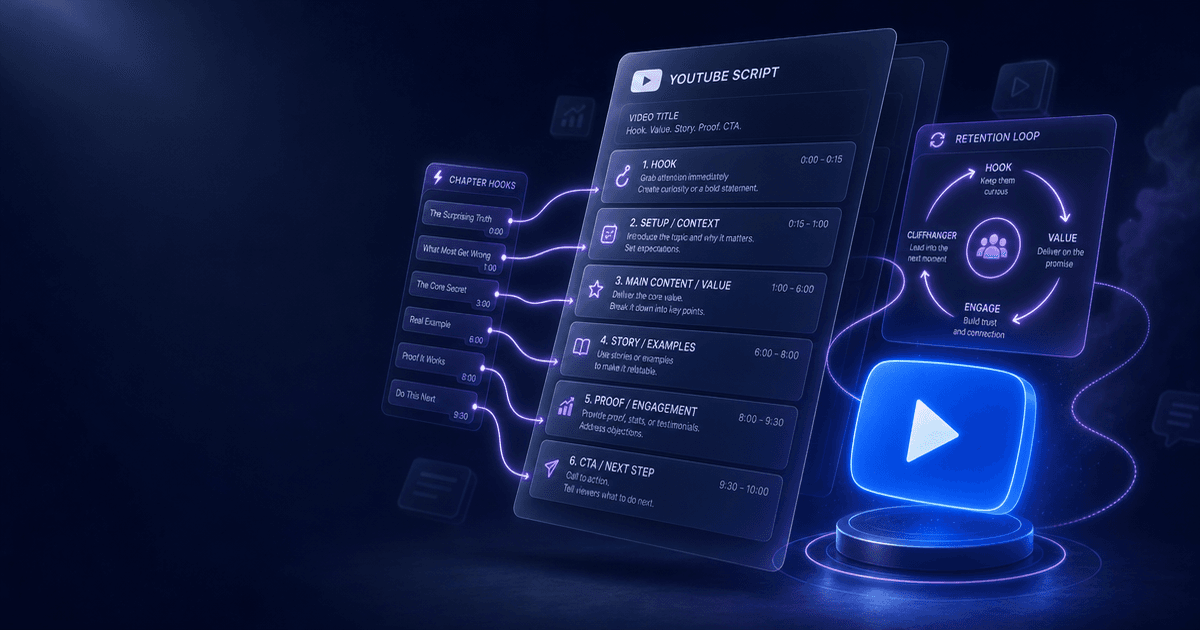
- AI Script Writer for YouTube — The Script Writer builds the structure and retention loops; the Voiceover skill adapts that structure into narration-optimized delivery. Run them in sequence for a complete faceless video production workflow.
- Faceless YouTube Channel System — A complete operating system for channels that don't show the creator's face — niche selection, content planning, script structure, and thumbnail strategy built around narrated video formats.
- Video Chapter Generator — Once narration is recorded, chapters help viewers navigate longer educational videos. The generator produces YouTube-formatted timestamps from your narration script in minutes.
Good narration doesn't sound like reading. It sounds like thinking out loud — structured, paced, and calibrated to what the listener needs to hear next, not what looks good on the page.
About the author
Content, CreatorSkills
The CreatorSkills team publishes practical guides on AI workflows for content creators.
About CreatorSkills