AI Script Writer for YouTube: Scripts That Keep Viewers Watching Until the End
Most YouTubers either over-script and sound robotic, or under-prepare and lose viewers in the first minute. The AI Script Writer for YouTube generates complete, filming-ready scripts with hooks engineered for 8-second retention, open loops that pull viewers through segment breaks, visual direction markers every 30-60 seconds, and outros that convert. This guide covers the hook system, the five video type structures, retention loop techniques, and how to match the script to your voice.
The YouTube algorithm doesn't care how much you know about your topic. It cares whether viewers make it past the first 30 seconds — and then the first two minutes — and then whether they stay through to the end.
That's a scripting problem, not a knowledge problem.
The default approach most creators take is one of two failures: write a full word-for-word script (which reads like a Wikipedia article on camera), or show up with a rough outline and trust that it comes together. The first sounds stiff. The second meanders. Both lose viewers in the first two minutes.
The AI Script Writer for YouTube generates scripts that live between those extremes — structured enough that you always know what comes next, loose enough that you sound like yourself, and built with the retention mechanics that keep viewers watching rather than clicking away.
The 8-Second Problem
You have 8 seconds to earn continued attention after someone clicks your thumbnail. That's not a heuristic — it's the cutoff where early click-away rates spike in most niches.
The skill uses four proven hook patterns, each engineered to make those 8 seconds count:
Bold Claim — A specific, surprising statement that reframes what the viewer thinks they know. "I've reviewed 200 phones in five years, and this $300 phone outperformed every flagship" works because it's specific and counterintuitive. The vaguer version — "I want to talk about budget phones" — doesn't hook anyone.
Open Loop — Plant a promise you won't fulfill until later. "By the end of this video, you'll have a complete home studio — and the total cost was under $150." The viewer now has a reason to stay. The loop is open. If they leave, they don't get the payoff.
Problem-Agitate — Start with the viewer's frustration and put words to it before offering anything. "You've been editing for 6 hours. Your timeline is a mess. Here's what changed everything for me." This technique works because it proves you understand the viewer's situation before you say anything about your solution.
Pattern Interrupt — Begin with something that contradicts the assumption embedded in your own thumbnail or title. "Don't buy a 4K camera. I'm serious. Let me explain." The viewer clicked because they expected one thing; you've immediately broken that expectation in a way that compels them to hear why.
The skill selects and writes the opening hook based on your video type and what will land hardest for your specific topic.
The Script Skeleton
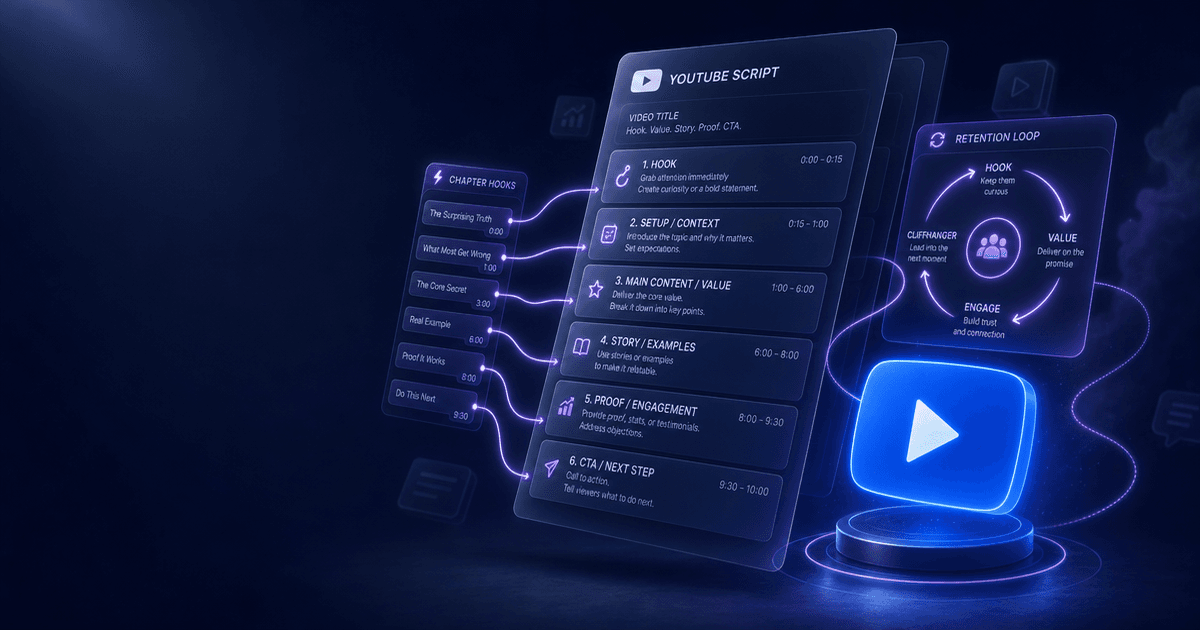
Every script the skill generates follows the same underlying structure, timed to your target video length:
HOOK (0:00 – 0:30)
INTRO / CONTEXT (0:30 – 1:30)
BODY — Sections with retention loops
CLIMAX / KEY PAYOFF
OUTRO / CTA
What distinguishes a well-structured script from a list of talking points is what happens inside the body sections: retention loops that keep viewers from clicking away at every natural break point.
Retention Loops: What Keeps People Watching
The biggest misconception about YouTube retention is that it's about making content shorter. The real mechanism is different: viewers leave at transition points — moments when the logical flow of one segment ends and another begins. That gap is where the skip happens.
Retention loops close that gap by creating an unresolved tension that the next segment will resolve.
Open loops are the most reliable technique. Before finishing one segment, plant a question you won't answer yet. "I'll show you the setup that makes this work in a second — but first, you need to understand why the standard approach fails." The viewer now has a reason to stay through the next segment to get the answer.
Pattern interrupts break the rhythm before it gets predictable. Every 2-4 minutes, something should shift — tone, energy, visual treatment, direct address to the viewer. The mind habituates to patterns quickly; interrupting the pattern resets attention.
Re-hooks are transition lines that re-earn attention at each segment break instead of just moving to the next topic. "That was the easy part. What comes next is where most people fall apart" is a re-hook. "Okay, so moving on to tip number three" is not.
The skill writes explicit re-hooks at every major transition, so you never have to improvise the most retention-critical moments in the script.
Video Type Structures
Different video formats require different skeletons. The skill selects the right structure based on what you tell it about your video type:
Tutorial — Problem → Foundation → Steps → Pro Tips → Result. The payoff (the viewer completing the task successfully) is teased from the hook and built toward incrementally. Each step needs a "why this matters" beat, not just instructions.
Review — First Impression → Deep Dive → Comparisons → Verdict. The verdict is the promised payoff; everything before it builds the credibility that makes the verdict meaningful. The comparison section is where most reviews lose viewers — the skill builds in retention loops around the comparison that keep viewers through the part where you're discussing specs.
Storytelling — Mid-story drop → Backstory → Rising Action → Turning Point → Resolution. Starting in the middle of the story (the moment of highest tension) before rewinding is more effective than starting at the beginning, because the viewer already knows the story is worth following.
Listicle — Tease Best → Items in Order → Best Reveal → Wrap-up. The most counterintuitive structure here: tease the best item early without revealing it, then build toward it. Viewers who know what #1 is have no reason to stay. Viewers who heard "I'll save the best for last" do.
Commentary — Hot Take → Evidence → Counterarguments → Nuance → Conclusion. The hot take is the hook; the evidence and counterarguments are what separate credible commentary from drive-by opinions. The nuance section is what separates you from the creators who get ratio'd.
Visual Direction Markers
A script without visual direction is half a script. The AI Script Writer embeds direction markers throughout:
[B-ROLL: description]— cut to supplementary footage while narration continues[GRAPHIC: description]— on-screen text, diagrams, or data visualizations[CUT TO: description]— camera angle or perspective changes[ENERGY: HIGH/MEDIUM/LOW/BUILD]— delivery and pacing cues
The rule of thumb is one visual direction marker every 30-60 seconds. When there are no direction cues for 90 seconds of talking-head footage, editors struggle and viewers notice the visual monotony before they consciously understand why they want to click away.
The Outro That Actually Converts
Most outros fail because they either list too many things ("hit the like button, subscribe, check the link in the description, comment below, watch this video next, sign up for my newsletter") or they're too passive ("hope you found that helpful, see you in the next one").
The skill generates outros with three specific components:
Payoff Callback — Reference the hook or promise you made in the first 30 seconds. If you opened with "by the end of this video, you'll have X," the outro delivers that X explicitly. The viewer's brain registers the loop closing.
Value Bridge — A single line that connects this video to the next action they should take. Not a menu of options — one bridge. "If you want to take the next step with this, the video on [related topic] is what to watch next" directs the viewer without overwhelming them.
One Clear CTA — Pick the action that matters most for your channel right now and make the ask specific. "Hit subscribe" with no context underperforms "subscribe and hit the bell — I publish every Tuesday so you don't miss it." The bell instruction is specific. The reason to subscribe ("Tuesday") is clear.
How to Use It
Tell the skill your channel niche and target audience, your video topic and type, your target length, and your voice (casual, authoritative, high-energy). Include any must-hit talking points or sponsor segments.
The skill generates the complete script — opening hook verbatim, body with retention loops and visual cues embedded, transition lines at every segment break, and a fully written outro — ready to print and film from.
For the best results: use the script as a floor, not a ceiling. The skill writes what should be said; you bring the delivery, the tangents that actually work, and the energy that no script can prescribe.
Who Gets the Most Out of This Skill
Creators who know their topic but struggle to structure it — Subject matter expertise doesn't automatically produce watchable video structure. The skill turns your knowledge into a video architecture that holds viewers.
Creators whose retention drops off mid-video — If your analytics show a spike in drop-offs at the 3-minute or 5-minute mark, the problem is almost always missing retention loops at segment transitions. The skill builds those in by default.
Creators who improvise and run long — If your target length is 12 minutes and you're consistently hitting 22, scripting the key transitions (not every word) gives you pacing control without making you sound scripted.
New creators — Starting without a script framework means learning retention mechanics through months of trial and error. Starting with a script that embeds retention architecture from the first video builds the habit faster.
Pricing and Where to Get It
The AI Script Writer for YouTube is $7, one-time. Works in Claude and ChatGPT — give it your topic and voice, get back a complete filming-ready script.
→ Get the AI Script Writer for YouTube
Pair It With
- AI Title A/B Testing Framework — A great script starts with a great title. The A/B Testing Framework generates 8 title variants, scores them on curiosity, clarity, SEO, and click-through potential, and builds a clean test plan so you stop choosing titles by gut feel.
- AI Thumbnail Factory — The script earns retention; the thumbnail earns the click. The Thumbnail Factory generates 3 CTR-optimized concepts for any video with layout specs, text overlay, color palettes, and ready-to-paste AI image prompts.
- Video Chapter Generator — Once the script is done, chapters help viewers navigate it and improve search visibility. The Video Chapter Generator formats timestamps to YouTube requirements and writes chapter titles under 40 characters.
Eight seconds. That's what every script has to earn before the viewer makes the decision to stay. Get those eight seconds right and the rest of the script is a chance to keep building trust — one retention loop at a time.
About the author
Content, CreatorSkills
The CreatorSkills team publishes practical guides on AI workflows for content creators.
About CreatorSkills