How to Use Midjourney for YouTube Thumbnails (2026)
Step-by-step guide + 15 copy-paste Midjourney prompts for faceless, gaming, ASMR, and reaction YouTube channels. Get scroll-stopping thumbnails fast.
The shortcut: scroll to the prompt that matches your channel type, copy it, generate 4 variations, drop text on top in Canva. Click-worthy thumbnail in under 10 minutes — no design background needed.
A great YouTube thumbnail has to do one job: create a click reason in a 1.6-second scroll. Most AI prompt lists fail that test — they spit out generic stock-photo aesthetics that blend into the homepage. The 15 prompts below are different. Each one is tuned to a specific channel type (faceless, reaction, before/after, gaming, ASMR, listicle, and more) with the framing, lighting, and 16:9 settings that actually drive CTR on YouTube in 2026.
You can spend 10 hours on the perfect script and still get buried because your thumbnail looks like background noise. Hiring a designer costs $50–200 per thumbnail. Learning design yourself takes months. Midjourney lets you skip both — if you start with the right prompt structure.
Want this automated? The [AI Thumbnail Factory](/skills/ai-thumbnail-factory?utm_source=blog&utm_medium=organic&utm_campaign=blog_cta_retail_2026&utm_content=midjourney-prompts-youtube_ai-thumbnail- skill returns 3 CTR-optimized concepts (layout, text, color palette, and ready-to-paste image prompt) in 2 minutes. Use the prompts on this page if you want full control. Use the skill if you want speed.
Which prompt should you pick?
| If your channel is… | Jump to |
|---|---|
| Faceless / educational / explainer | #1 Faceless 3D icon |
| Commentary / reaction / opinion | #2 Reaction portrait |
| Tutorial / transformation / makeover | #3 Before/after split |
| Course / how-to / talking-head | #4 Minimalist text-heavy |
| Product / unboxing / review | #5 Dramatic object focus |
| Personal finance / strategy / planning | #6 Hand-drawn sketch |
| Gaming / streamer | #7 Gaming screenshot |
How to use these prompts
For each prompt below, replace the bracketed sections with your specific details. The structure matters: subject description, style keywords, technical specs for YouTube dimensions.
Pro tip: Generate 4-5 variations of each prompt. Midjourney is probabilistic — the 3rd or 4th generation often hits better than the first.
Another tip: Use --ar 16:9 at the end of every prompt to get the correct YouTube aspect ratio.
1. The Faceless Channel Thumbnail
Best for: Educational, finance, tech, and storytelling channels without a host on camera.
[SUBJECT] as a 3D rendered icon, floating on a [COLOR1] to [COLOR2] gradient background, soft studio lighting, minimalist design, depth of field blur on background, clean composition, high-end editorial style, 8k render --ar 16:9 --style raw --v 6
Example: A golden piggy bank with coins, 3D rendered icon, floating on a deep blue to purple gradient background, soft studio lighting, minimalist design, depth of field blur on background, clean composition, high-end editorial style, 8k render --ar 16:9 --style raw --v 6
Why it works: Faceless thumbnails need instant visual clarity. The 3D icon style creates depth and polish without requiring a face or personality to carry the frame.
2. The "Confused Reacting" Thumbnail
Best for: Commentary, reaction, and opinion videos where emotion drives clicks.
Hyper-realistic portrait of a person with [EXPRESSION], [AGE/GENDER], wearing [CLOTHING], dramatic side lighting creating strong shadows, [BACKGROUND COLOR] background with subtle texture, shallow depth of field, YouTube thumbnail style, professional photography, 8k --ar 16:9 --style raw --v 6
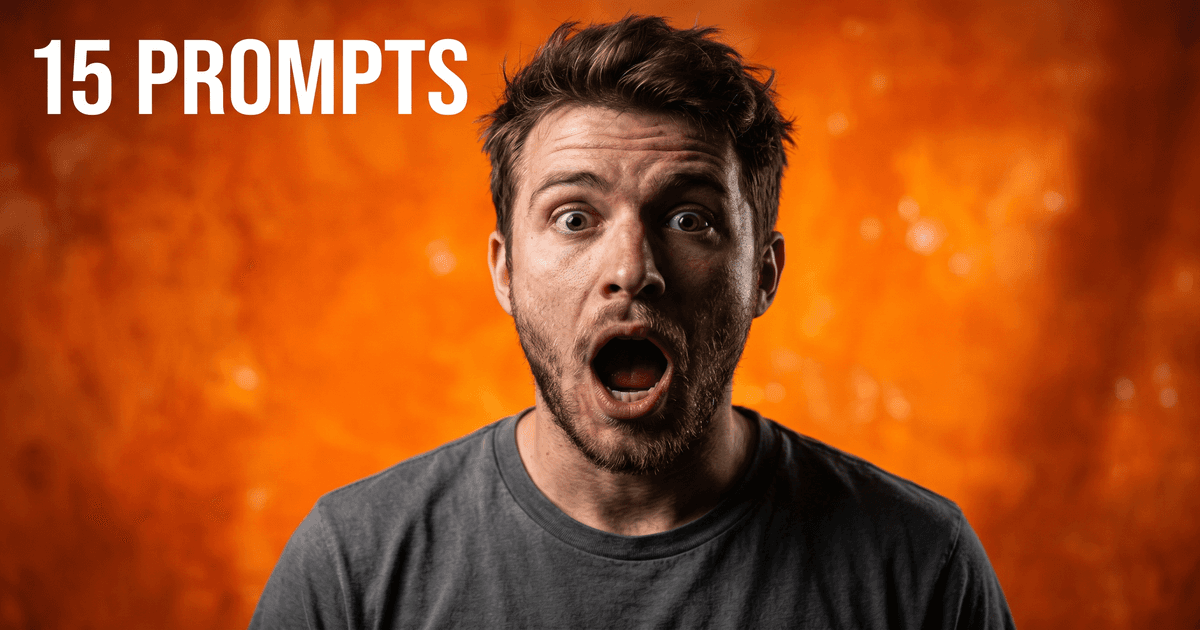
Example: Hyper-realistic portrait of a person with jaw dropped in disbelief, young adult male, wearing casual t-shirt, dramatic side lighting creating strong shadows, vibrant orange background with subtle texture, shallow depth of field, YouTube thumbnail style, professional photography, 8k --ar 16:9 --style raw --v 6
Why it works: MrBeast proved that exaggerated facial reactions drive clicks. This prompt gives you the lighting and composition of high-performing reaction thumbnails.
3. The Before/After Split Screen
Best for: Transformation content, tutorials, makeovers, and comparison videos.
Split-screen composition, left side: [BEFORE SCENE] in muted desaturated colors, right side: [AFTER SCENE] in vibrant saturated colors, dramatic contrast between sides, centered dividing line, photorealistic style, professional photography lighting, YouTube thumbnail format, 8k --ar 16:9 --style raw --v 6
Example: Split-screen composition, left side: cluttered messy room in muted desaturated colors, right side: organized minimalist room in vibrant saturated colors, dramatic contrast between sides, centered dividing line, photorealistic style, professional photography lighting, YouTube thumbnail format, 8k --ar 16:9 --style raw --v 6
Why it works: Before/after is a psychological trigger. Our brains are wired to complete the pattern — we have to see what changed.
4. The Minimalist Text-Heavy Thumbnail
Best for: Educational content where the title concept is the hook.
Bold minimalist design, large text "[TEXT]" in [FONT STYLE], floating 3D elements related to [TOPIC], [COLOR SCHEME] color palette, clean negative space, modern graphic design style, subtle gradients, professional typography, centered composition, YouTube thumbnail dimensions --ar 16:9 --style raw --v 6
Example: Bold minimalist design, large text "5X" in bold sans-serif, floating 3D coins and graphs, deep navy and gold color palette, clean negative space, modern graphic design style, subtle gradients, professional typography, centered composition, YouTube thumbnail dimensions --ar 16:9 --style raw --v 6
Why it works: Sometimes the title itself is the click driver. This style treats the thumbnail like a magazine cover where typography does the heavy lifting.
5. The Dramatic Object Focus
Best for: Product reviews, unboxings, and "thing"-focused content.
[OBJECT] suspended in mid-air, dramatic overhead lighting, floating particles and dust motes visible, dark moody background, cinematic depth of field, product photography style, hyper-detailed textures, professional studio lighting, YouTube thumbnail composition, 8k render --ar 16:9 --style raw --v 6
Example: iPhone suspended in mid-air, dramatic overhead lighting, floating particles and dust motes visible, dark moody background, cinematic depth of field, product photography style, hyper-detailed textures, professional studio lighting, YouTube thumbnail composition, 8k render --ar 16:9 --style raw --v 6
Why it works: Apple built an empire on this visual language. The floating product shot signals premium quality and attention to detail.
6. The Hand-Drawn Sketch Style
Best for: Personal finance, planning, strategy, and "how to think" content.
Hand-drawn sketch style, [SCENE DESCRIPTION] on a textured paper background, pencil and ink illustration, warm natural lighting, artistic and personal feel, subtle shadows, clean lines mixed with organic textures, YouTube thumbnail layout, professional illustration style --ar 16:9 --style raw --v 6
Example: Hand-drawn sketch style, mind map with money concepts on a textured paper background, pencil and ink illustration, warm natural lighting, artistic and personal feel, subtle shadows, clean lines mixed with organic textures, YouTube thumbnail layout, professional illustration style --ar 16:9 --style raw --v 6
Why it works: Sketch style feels approachable and handmade. It signals "I actually thought about this" rather than "I generated this in 30 seconds."
7. The Gaming Screenshot Style
Best for: Gaming content where authenticity matters.
Screenshot from [GAME GENRE] game, [SCENE DESCRIPTION], vibrant saturated colors, dynamic camera angle, action moment frozen in time, HUD elements visible, motion blur on background, video game graphics style, cinematic composition, YouTube gaming thumbnail --ar 16:9 --style raw --v 6
Example: Screenshot from open-world RPG game, character standing on cliff overlooking vast landscape, vibrant saturated colors, dynamic camera angle, action moment frozen in time, HUD elements visible, motion blur on background, video game graphics style, cinematic composition, YouTube gaming thumbnail --ar 16:9 --style raw --v 6
Why it works: Gamers can spot fake screenshots instantly. This prompt mimics the authentic look of actual gameplay while optimizing for thumbnail composition.
8. The "Number List" Visual
Best for: Listicles, "X ways to..." content, and ranked countdowns.
Bold graphic design, large number "[NUMBER]" in foreground, [THEME ELEMENTS] arranged around it, [COLOR PALETTE] colors, flat design style with subtle shadows, clean geometric shapes, modern minimalist aesthetic, YouTube thumbnail layout, professional graphic design --ar 16:9 --style raw --v 6
Example: Bold graphic design, large number "7" in foreground, fitness icons and gym equipment arranged around it, bold red and black colors, flat design style with subtle shadows, clean geometric shapes, modern minimalist aesthetic, YouTube thumbnail layout, professional graphic design --ar 16:9 --style raw --v 6
Why it works: Numbers promise specificity. When someone sees "7 Mistakes" they know exactly what they're getting — and it's usually less time than they'd expect.
9. The Lifestyle/Travel Shot
Best for: Vlogs, travel content, day-in-the-life videos, and aspirational content.
[SCENE DESCRIPTION], golden hour lighting, cinematic color grading, [MOOD] atmosphere, shallow depth of field, professional travel photography style, authentic candid moment, vibrant but natural colors, YouTube thumbnail composition, 8k --ar 16:9 --style raw --v 6
Example: Person working on laptop at beach cafe, golden hour lighting, cinematic color grading, relaxed productive atmosphere, shallow depth of field, professional travel photography style, authentic candid moment, vibrant but natural colors, YouTube thumbnail composition, 8k --ar 16:9 --style raw --v 6
Why it works: Aspiration drives clicks in lifestyle content. Golden hour lighting makes even ordinary scenes feel cinematic and desirable.
10. The Dark Mode Tech Aesthetic
Best for: Tech reviews, software tutorials, coding content, and digital product showcases.
[SUBJECT] on dark background, neon accent lighting in [COLOR], reflective surfaces, futuristic tech aesthetic, cinematic lighting, high contrast, cyberpunk influences, minimal UI elements, professional product photography, YouTube thumbnail style, 8k render --ar 16:9 --style raw --v 6
Example: Smartphone on dark background, neon accent lighting in cyan, reflective surfaces, futuristic tech aesthetic, cinematic lighting, high contrast, cyberpunk influences, minimal UI elements, professional product photography, YouTube thumbnail style, 8k render --ar 16:9 --style raw --v 6
Why it works: Dark mode reduces visual clutter and creates premium, high-end vibes. The neon accent draws the eye to the focal point.
11. The Food/Recipe Flat Lay
Best for: Cooking channels, recipe content, and food photography.
Overhead flat lay of [FOOD ITEMS] on [SURFACE], natural lighting from window, rustic styling with [PROPS], appetizing food photography, vibrant fresh colors, slight messiness for authenticity, professional culinary photography, YouTube thumbnail composition, 8k --ar 16:9 --style raw --v 6
Example: Overhead flat lay of artisan bread and ingredients on marble surface, natural lighting from window, rustic styling with linen napkin and wooden utensils, appetizing food photography, vibrant fresh colors, slight messiness for authenticity, professional culinary photography, YouTube thumbnail composition, 8k --ar 16:9 --style raw --v 6
Why it works: Food thumbnails succeed on texture and color. The slight messiness prevents the sterile "stock photo" look that kills engagement.
12. The "Process" Behind-the-Scenes
Best for: Behind-the-scenes content, "how I make" videos, and creator workflow reveals.
Over-the-shoulder view of [PERSON DESCRIPTION] working on [ACTIVITY], desk/workspace visible, natural lighting, candid documentary style, [COLOR TONES] color grading, authentic creator environment, YouTube thumbnail composition, professional photography --ar 16:9 --style raw --v 6
Example: Over-the-shoulder view of creator working on video editing, desk with multiple monitors visible, natural lighting, candid documentary style, warm color grading, authentic creator environment, YouTube thumbnail composition, professional photography --ar 16:9 --style raw --v 6
Why it works: Behind-the-scenes content performs because it promises exclusive access. The over-the-shoulder perspective feels intimate and real.
13. The Abstract Concept Visualization
Best for: Philosophy, psychology, self-improvement, and abstract concept videos.
Surreal abstract visualization of [CONCEPT], dreamlike atmosphere, symbolic elements representing [THEMES], [COLOR SCHEME] color palette, ethereal lighting, artistic composition, thought-provoking imagery, fine art photography style, YouTube thumbnail format --ar 16:9 --style raw --v 6
Example: Surreal abstract visualization of decision-making crossroads, dreamlike atmosphere, symbolic elements representing choices and paths, deep purples and golds color palette, ethereal lighting, artistic composition, thought-provoking imagery, fine art photography style, YouTube thumbnail format --ar 16:9 --style raw --v 6
Why it works: Abstract concepts need visual metaphors. This prompt helps translate ideas like "burnout" or "mindset shifts" into arresting imagery.
14. The Fitness/Workout Action Shot
Best for: Fitness content, workout tutorials, and transformation journeys.
Dynamic action shot of [PERSON DESCRIPTION] doing [EXERCISE], muscular definition visible, dramatic gym lighting with strong shadows, motion blur suggesting power, [COLOR GRADING] color grade, intense focus on face, sports photography style, YouTube fitness thumbnail --ar 16:9 --style raw --v 6
Example: Dynamic action shot of athlete doing deadlift, muscular definition visible, dramatic gym lighting with strong shadows, motion blur suggesting power, high contrast desaturated color grade, intense focus on face, sports photography style, YouTube fitness thumbnail --ar 16:9 --style raw --v 6
Why it works: Fitness thumbnails compete on intensity. The motion blur and dramatic lighting signal energy and commitment.
15. The Cozy/Comfort Content Style
Best for: Study with me, chill content, ASMR-adjacent videos, and comfort viewing.
Cozy [SETTING] scene, [TIME OF DAY] lighting, warm color palette, [ACTIVITIES/OBJECTS] visible, soft focus background, hygge aesthetic, peaceful atmosphere, lifestyle photography style, YouTube thumbnail composition, 8k --ar 16:9 --style raw --v 6
Example: Cozy bedroom scene, evening golden hour lighting, warm color palette, open books and coffee cup visible, soft focus background, hygge aesthetic, peaceful atmosphere, lifestyle photography style, YouTube thumbnail composition, 8k --ar 16:9 --style raw --v 6
Why it works: Comfort content is one of YouTube's fastest-growing categories. These thumbnails signal "relaxing content ahead" — a different kind of click driver.
Important: Text and branding
Midjourney is getting better at text, but it's still unreliable. Don't rely on Midjourney for text.
Instead:
- Generate the background/visual with Midjourney
- Add text in Canva, Photoshop, or your tool of choice
- Use bold, readable fonts (Montserrat, Impact, Oswald work well)
- Keep text under 5 words for thumbnails
- Make sure text is readable at small sizes (mobile)
For brand consistency, add your face (if you show it) or logo in the same position on every thumbnail.
What to do next
These prompts give you a starting point, but the real value comes from iteration. Save the generations that work. Note which prompts perform best for your specific content type. Build your own library.
If you're serious about YouTube growth, consider complementing these design prompts with AI skills for scripting and an [AI YouTube thumbnail generator](/skills/ai-thumbnail-factory?utm_source=blog&utm_medium=organic&utm_campaign=blog_cta_retail_2026&utm_content=midjourney-prompts-youtube_ai-thumbnail- Once you have concepts, the [Thumbnail A/B Test Analyzer](/skills/thumbnail-ab-test-analyzer?utm_source=blog&utm_medium=organic&utm_campaign=blog_cta_retail_2026&utm_content=midjourney-prompts-youtube_thumbnail-ab- helps you pick the winner with data instead of gut feel. The thumbnail gets the click. The content keeps the viewer.
Quick wins for this week:
- Pick 3 prompts from this list that match your content type
- Generate 10 variations of each (use Remix in Midjourney)
- Add text overlays in your preferred design tool
- A/B test with your next 3 video uploads
Remember: The best thumbnail is the one that gets clicked. Data beats aesthetics. Track your CTR and iterate toward what works for your specific audience.
Frequently asked questions
Do I need Midjourney subscription for thumbnails?
The free trial gives you about 25 generations. For regular thumbnail creation, you'll want a Basic plan ($10/month) which gives you ~200 generations. That's enough for 50+ thumbnails if you're generating 4 variations each.
Can I use these images commercially on YouTube?
Yes. Midjourney's paid subscriptions grant commercial usage rights. You own the images you generate and can use them for thumbnails, channel art, and other YouTube assets.
What if Midjourney generates weird faces or hands?
Use --style raw and --v 6 for more realistic results. If faces are critical, consider using these prompts for backgrounds only and adding your own face via Photoshop or a photo overlay.
Should I use the same style for every thumbnail?
Consistency helps with brand recognition, but don't sacrifice clickability for consistency. Viewers should recognize your video, but the thumbnail needs to stand out against competing videos. Find the balance.
How do I make these look less "AI-generated"?
Add imperfection. Slightly off-center compositions. Messy desks instead of perfect flat lays. Natural lighting instead of perfect studio setups. The more "real" the image looks, the less it triggers "AI image" pattern recognition in viewers.
What's better: Midjourney, DALL-E, or FLUX for thumbnails?
Midjourney leads on aesthetic quality and style variety. DALL-E 3 has better text rendering but less creative control. FLUX (via Leonardo or similar) is competitive on quality. Most YouTubers prefer Midjourney for the extensive styling options documented in these prompts.
Related resources
- How to Write YouTube Scripts With AI — Pair great thumbnails with great scripts
- AI Skills for Content Repurposing — Turn one video into a week's worth of content
- 5 AI Skills Every Creator Should Install — Essential AI workflows for YouTube growth
About the author
Founder, CreatorSkills
Caleb Leigh is the founder of CreatorSkills. He previously founded Visuals by Impulse — a leading design marketplace for live streamers, serving 400,000+ creators before its acquisition by CORSAIR. He now leads AI and automation at Elgato while building tools for the creator economy.
Read the founder profile